![59b7eb52c29cb1fb87e1bba7bf1ef88c41152899.png]](https://help.remesh.ai/hs-fs/hubfs/59b7eb52c29cb1fb87e1bba7bf1ef88c41152899.png?height=40&name=59b7eb52c29cb1fb87e1bba7bf1ef88c41152899.png)
This article is relevant to our Live, Flex and Video Conversations. You can find more information about our product offerings here.
Overview
Remy lets you ask natural-language questions about your Remesh data and receive concise, defensible answers with inline citations to the underlying evidence. No exports or complex prompting required.
Remy is optimized to understand Remesh’s unique question types and how to analyze them using our bespoke analysis tools. For more information about Remy and it’s capabilities, please reference this article.
Included in this Article
- Getting Started
- Select Conversations for Remy to Reference
- Upload Context
- Ask a Question
- Read Answers and Audit Citations
- Crosstab Analysis
- Analysis Visuals and PPTX Export
- Share Your Remy Thread
- Frequently Asked Questions
Getting Started
To get started with Remy’s analysis capabilities you will need:
- Access to at least one Conversation (Live, Flex, Video transcript, or Imported data)
- Generative AI (LLM) enabled for your Workspace and at least one team
Please note, in order to interact with Remy you will need to have Generative AI (LLM) features enabled for your Workspace and at least one team. To enable Generative AI (LLM) features in your workspace, please reference this article.
Select Conversations for Remy to Reference
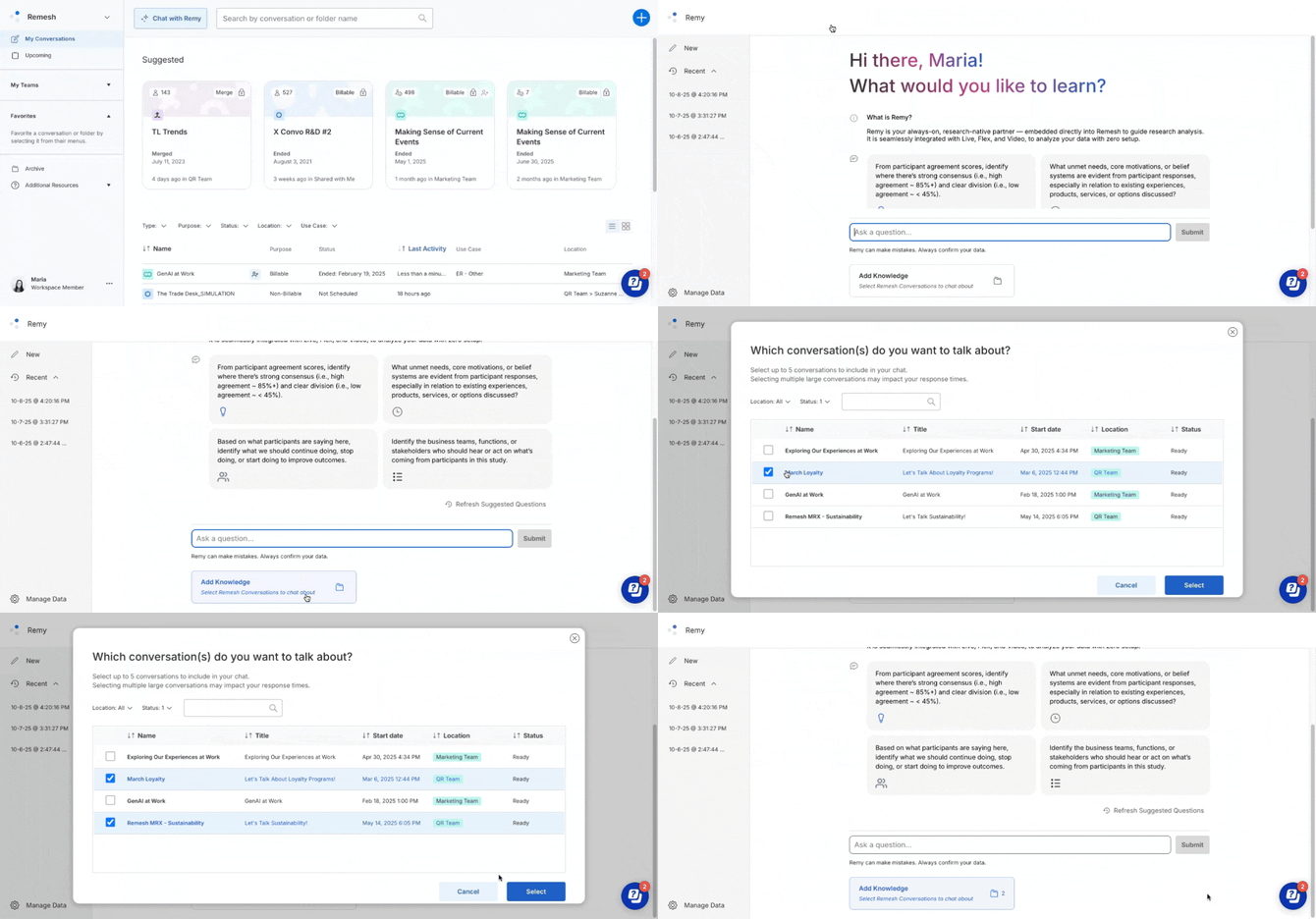
- From the Dashboard, click Chat with Remy to open Remy.
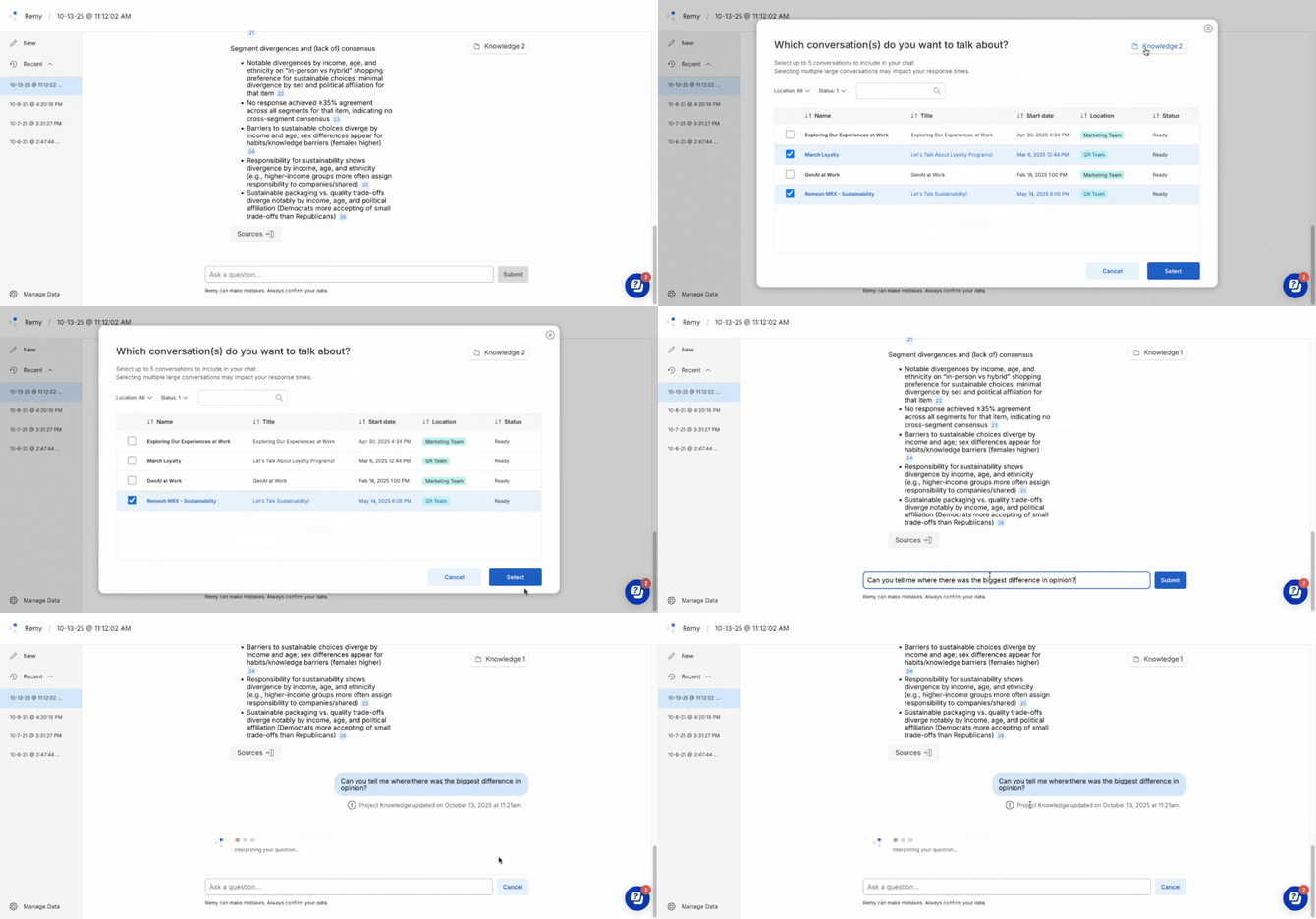
- Click Add knowledge below the chat bar.
- Select one or more Conversations to include.
Currently you can select up to 5 Conversations.
- Click Select to confirm. The chosen items become the “Project Knowledge” for your thread.
Remy works across Live, Flex, Merge and Data Import Conversations.
- If eligible Conversations aren’t showing in Add Knowledge, click Manage Data (bottom-left). Select items to Prepare data for Remy. Preparation can take several minutes; return to Project Knowledge to check availability.
Upload Context
Attach files and have Remy use them as context. Upload a brief, a prior discussion guide, or background material, and Remy can draw on it while planning and building with you.
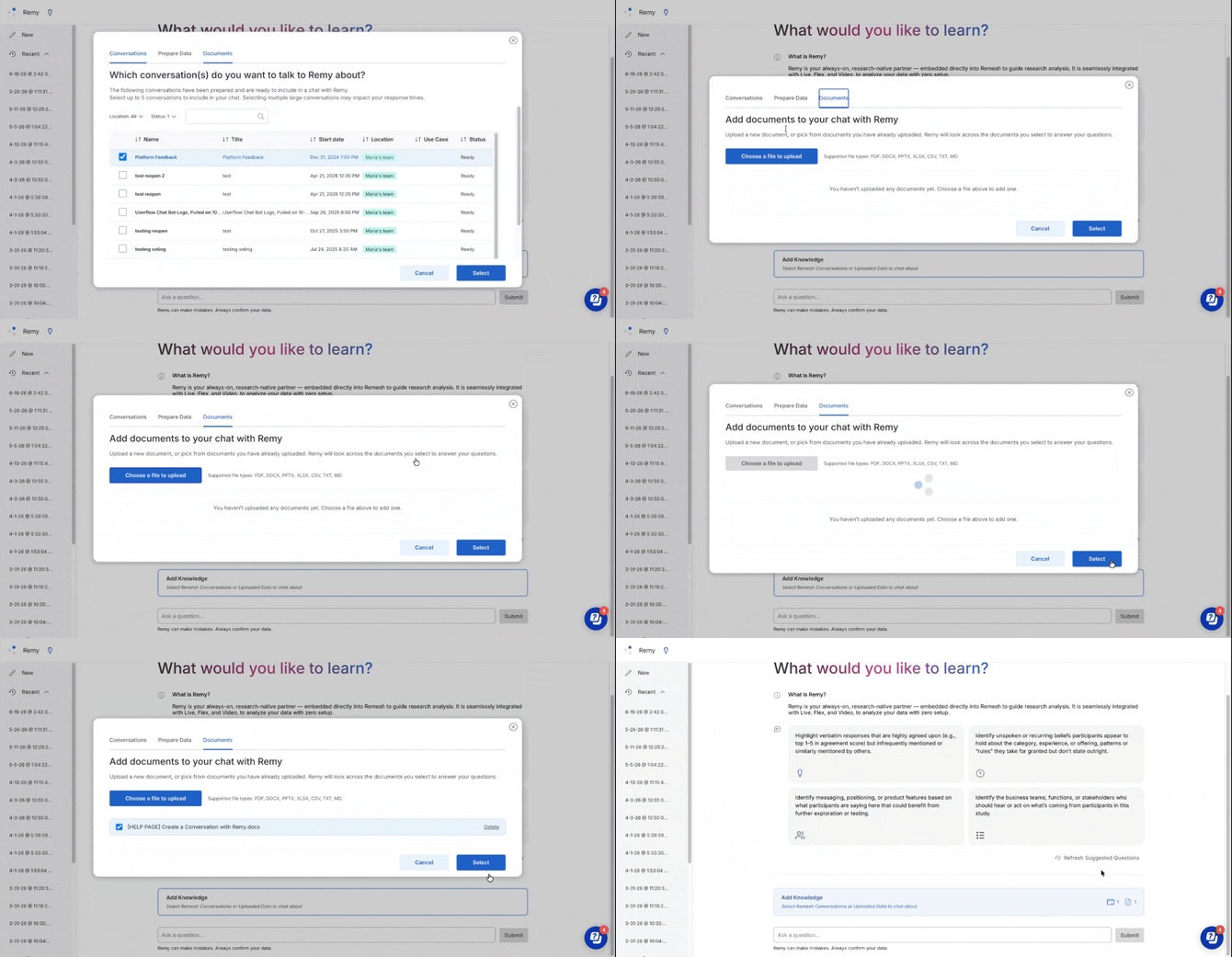
Supported file types: PDF, DOCX, PPTX, XLSX, CSV, TXT, MD
Ask a Question
Simply type a question as you would to a colleague. Remy automatically finds relevant data and to match with the right analysis tools to formulate an answer along with citations.
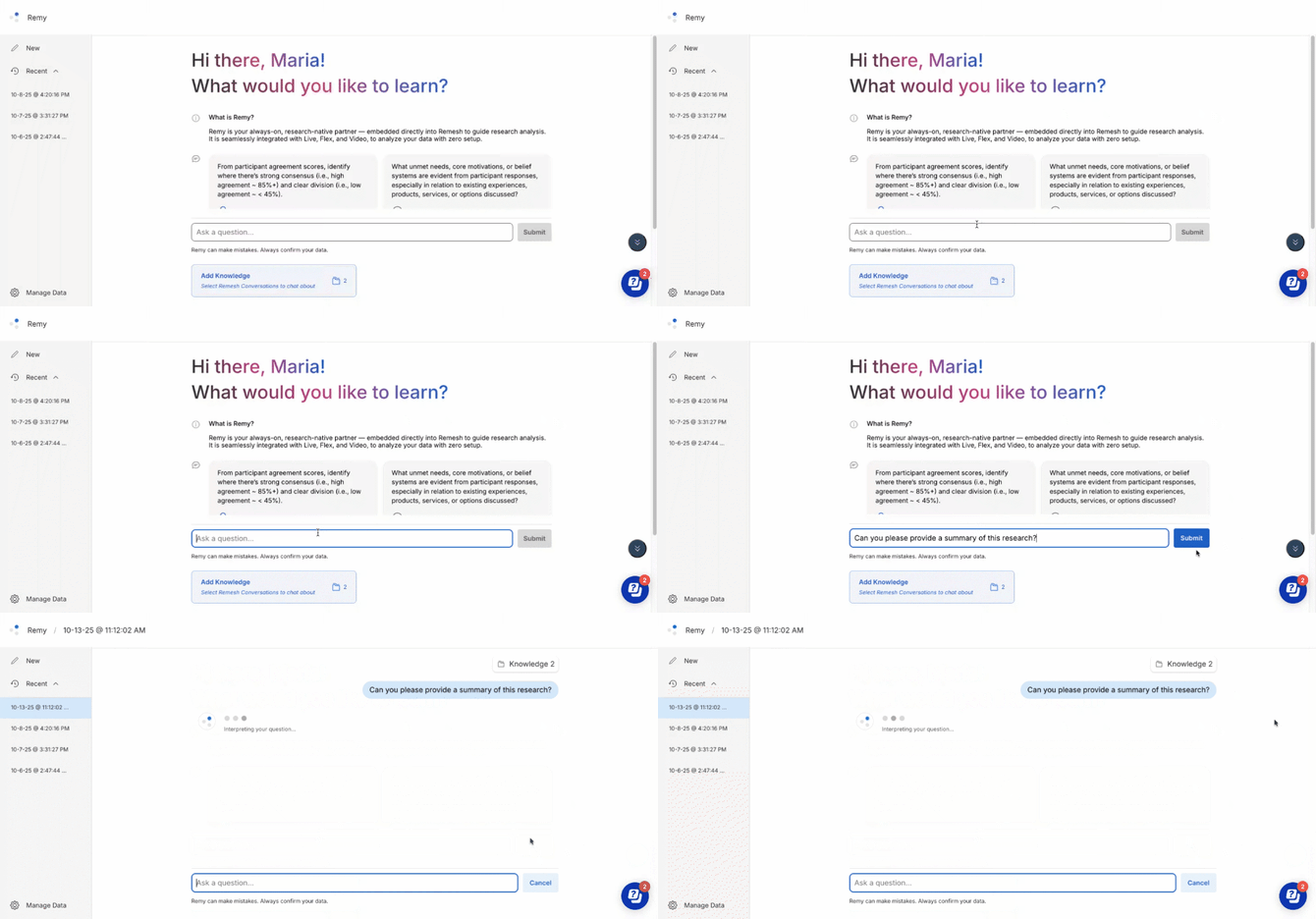
Depending on the complexity of the request, it is normal for Remy to take a few moments to develop a response.
Need help getting started? Here are a few examples.
Study-level
- “Share a quick summary of the study.”
- “Where do participants show strong consensus vs clear divergence on [topic]?”
Themes & quotes
- “List the main themes about [topic] with % Agree, then show 3 representative quotes.”
- “Find high-agreement but rarely mentioned verbatims on [topic].”
Quant + qual together
- “Triangulate poll splits on [construct] with the open-end narratives—do they align?”
Segments & differences
- “How did [segment A] vs [segment B] differ on [topic]?”
- “Which segments are most/least aligned with [theme]?”
Actionable outputs
- “Draft a Start/Stop/Continue plan for [goal], cite supporting quotes for each.”
Find additional ideas in the platform! You can do so by accessing Remy then clicking the lightbulb icon at the top of the page. Please note this is only available to users with cookies enabled.
Read Answers and Audit Citations
Remy returns a structured answer as a text stream. Each answer claim includes numbered footnotes. Click any number to open a Sources panel with the exact evidence that Remy used to draw that conclusion.
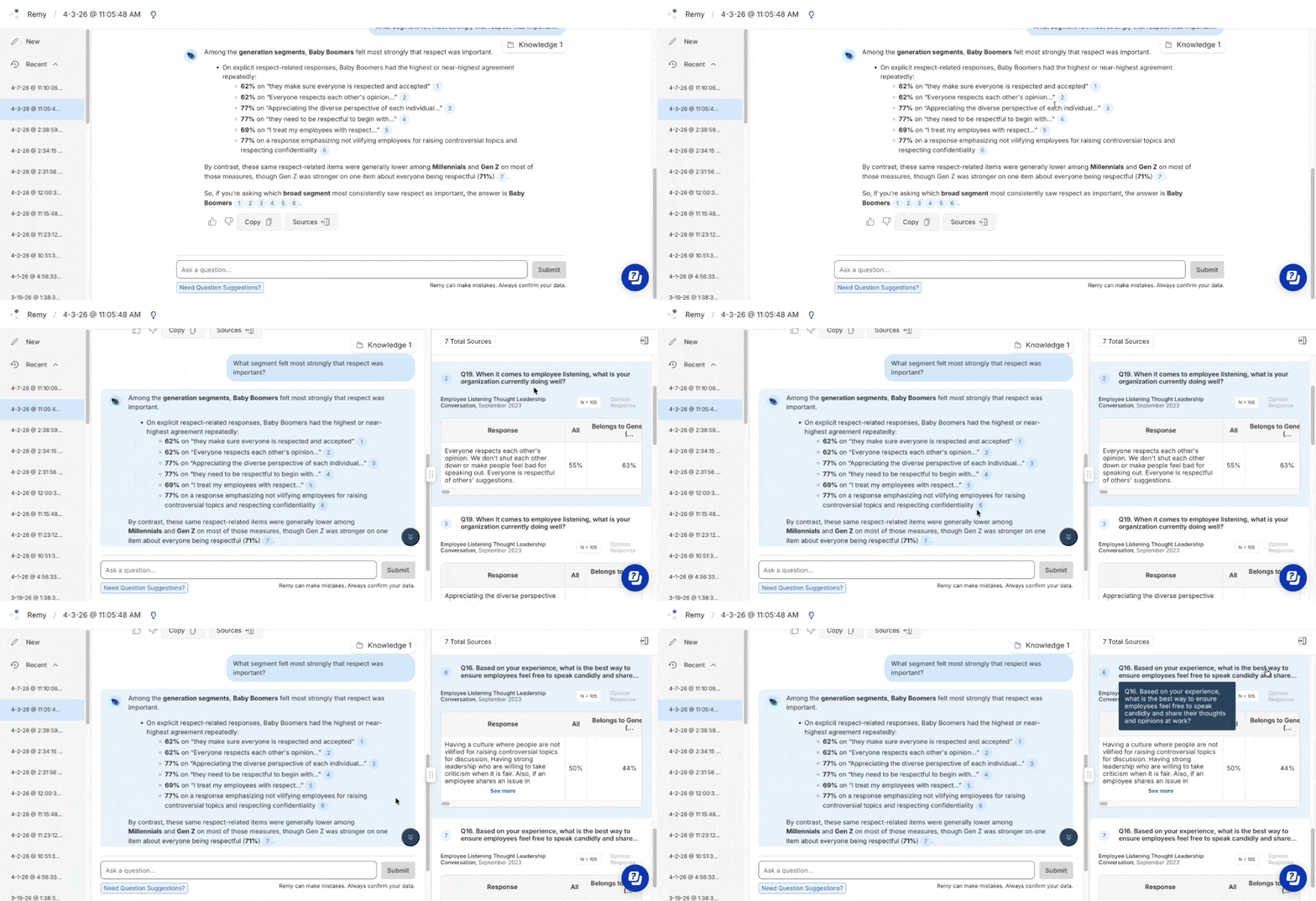
These citations will vary depending on the source of the information but can include Poll and Rank tables, one or more open end responses or verbatims (with % Agree when available), question based Summaries, and Themes / Tags . This makes every statement traceable to your study data.
- Poll/Rank: See distributions/tables for closed-ended questions.
- Open-ends: See themes and example responses; Opinion/Branch responses include % Agree.
- Experience Ask: Category tags and verbatims (no % Agree).
- Summaries based on individual questions from Summarize that combine ideas from individual questions
- Themes & Tags from Auto Code that indicate topical ideas from individual questions
Want to see the question text for the citation in question? Hover over the question number and Conversation name (ex: “Q12 of GenAi at Work”) to see the question text that was sent for that particular question.
Crosstab Analysis
You can ask Remy to cross-tabulate Poll or Ranking questions to see how responses overlap across variables. Remy computes these from participant-level data so results are exact, not estimated.
How to ask
Phrase your request naturally. Remy will identify the questions and return a structured table.
|
What you want |
Example prompt |
|---|---|
|
Two-variable crosstab |
Break down age group by income level |
|
Reference by question number |
Cross-tab Q4 by Q9 |
|
Three-variable crosstab |
Show purchase frequency by brand preference, split by gender |
|
Filtered crosstab |
Age by region for participants who selected "Agree" |
|
Exploratory |
What's the relationship between job satisfaction and tenure? |
What you get
A table with cell counts, column percentages, row percentages, and marginal totals. Each edit to your request returns a fresh, deterministic result. For three-variable crosstabs, the third variable creates sub-columns within each column for deeper segmentation.
.png?width=670&height=400&name=image%20(1).png)
Crosstabs require structured categorical data. Open-ended question types are not supported. You can read more about our question types here!
Continue the Conversation and Example Prompts
As you read and understand Remy’s responses, you can continue prompting Remy to further drill down into the data. Below are some examples of questions and the order in which you might ask them to glean the insights you need.
| Goal | Example Prompts |
|---|---|
| Get the big picture view and where patterns surface. | Identify the main themes, ideas, or topics emerging, capturing the range of perspectives regardless of whether they are widely shared or agreed upon among these participants throughout the whole study. |
| Move from data interpretation to insights. | What unmet needs, core motivations, or belief systems are evident from participant responses, especially in relation to existing experiences, products, services, or options discussed? |
| Incorporate insights into strategy. | Based on what participants are saying here, identify what we should continue doing, stop doing, or start doing to improve outcomes. |
| Prioritize steps and actions to move forward | Identify the business teams, functions, or stakeholders who should hear or act on what’s coming from participants in this study. |
Find additional prompt ideas in the platform! You can do so by accessing Remy then clicking the lightbulb icon at the top of the page. Please note this is only available to users with cookies enabled.
Update Data Scope
If you’d like Remy to reference additional or different Conversations while continuing to explore the same ideas and questions, you can use the Knowledge button to add or remove Conversations at any time. When the scope changes, Remy clearly notes the update so you know subsequent answers reflect the new Project Knowledge.
Analysis Visuals and PPTX Export
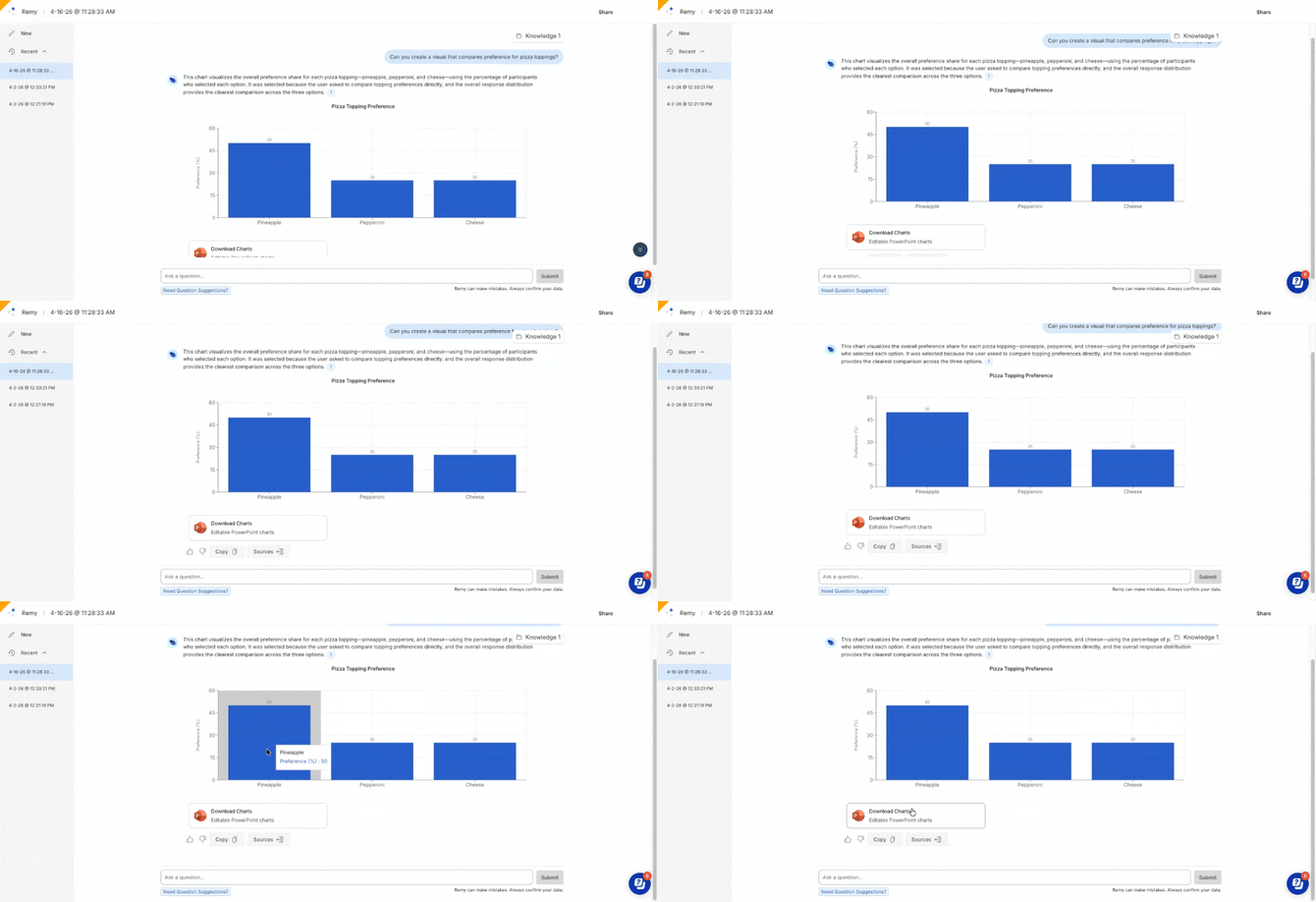
Remy can generate data visualizations directly in your chat specifically for Poll and Ranking questions. Any analytical question about your Conversation data may produce a visualization.- After you ask a question, Remy identifies if a visual could be supported, then selects the chart type automatically based upon your question. You can also ask Remy explicitly to generate a visual or request a specific visual type, listed below.
- Remy will generate one or more visuals for you, depending on identified need. Once the visual has been generated, you can click "Download Charts" below any answer to download an editable PPTX file.
Remy Visual Types
|
Visual Type |
Used For |
Example Prompt |
|---|---|---|
|
Bar Chart |
Distributions, rankings, comparisons |
"How did participants rank the features?" |
|
Pie Chart |
Composition and proportions |
"What percentage selected each option?" |
|
Scatter Plot |
Two-variable relationships |
"Plot agreement vs. mention rate." |
Share Your Remy Thread
Share individual Remy analysis threads with anyone via link and password. Observers view the thread in read-only mode, no Remesh account required.
- Open a Remy thread and click the share button in the upper right.
- In the Share Thread modal, toggle sharing to Enabled. The system generates a Join Link and Password.
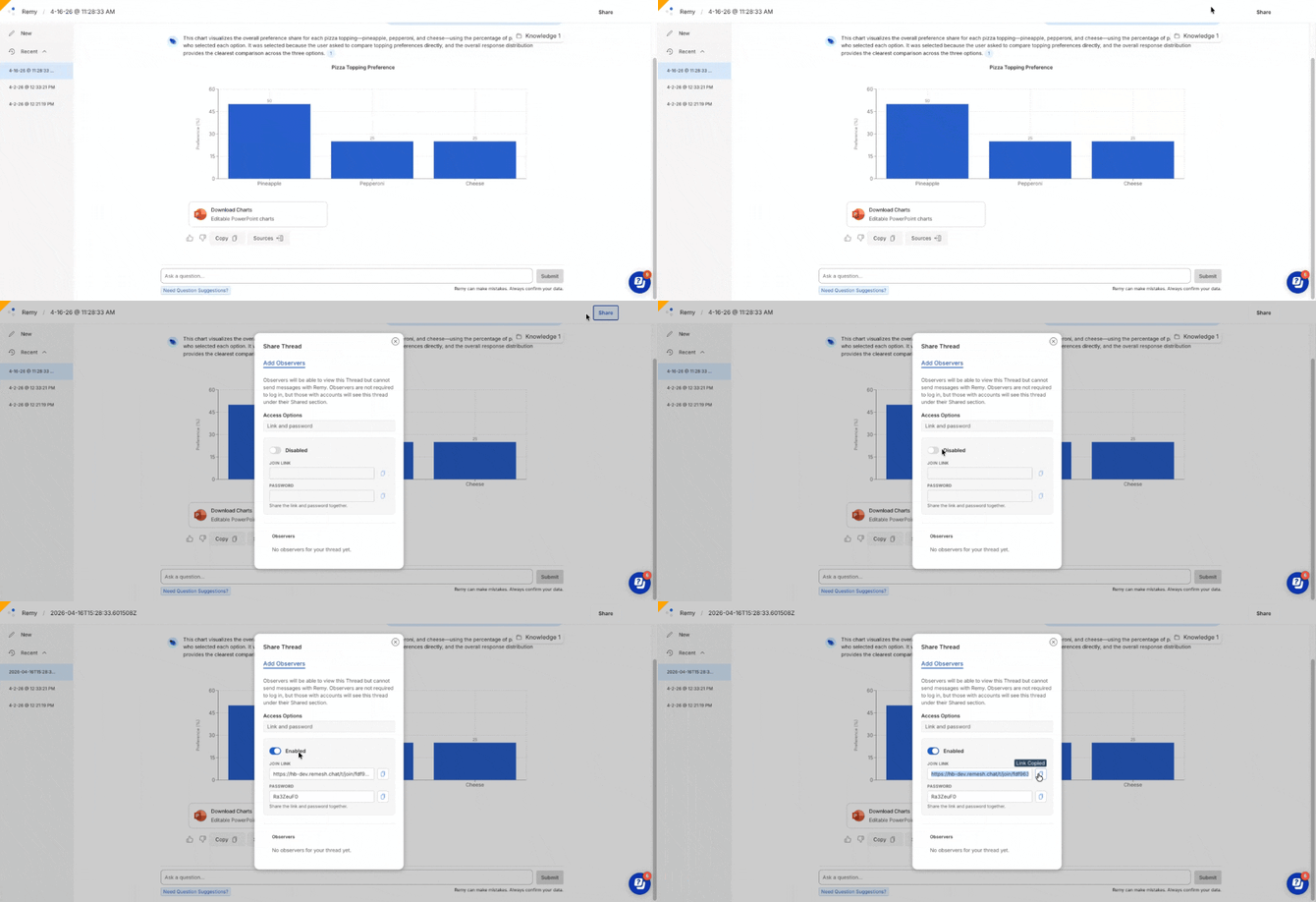
- Copy both and share.
- To access the shared thread, simply click the link, enter your password, then enter a display name.
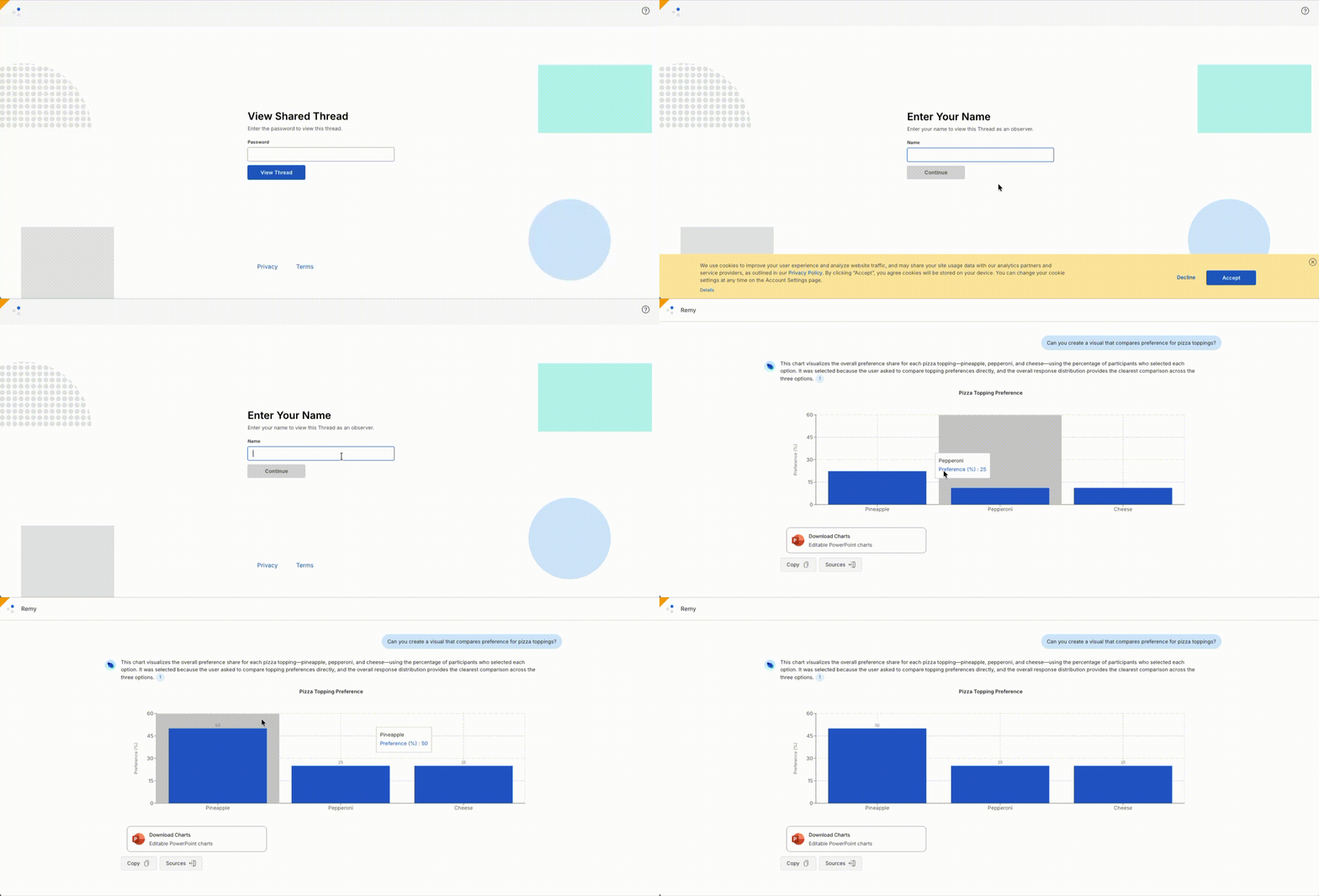
- Once accessed, the observer will be able to view the thread. If they have full access to the Conversation being analyzed, they will be able to click the citations to access source data. If they do not have access to that Conversation, the citations will appear as plain text.
- If you'd no longer like to share a thread, simply access that thread, click share, and click the toggle to disable.
Frequently Asked Questions
- What data types does Remy analyze?
Live, Flex and imported data. - How long do answers take?
Answer time varies with data size/scope and question complexity. - Is every statement in the answer backed by data?
Yes. Click citations to see the exact sources (summaries, tables, themes, quotes) that support each claim. - Can I change the data mid-thread?
Yes. Use the Knowledge button to add/remove Conversations. Remy will confirm that the Project Knowledge changed. - Does Remy ever act on my behalf (e.g., launch research)?
Remy suggests next steps but does not take actions without your approval; all outputs are reviewable/editable. - How many Conversations can Remy reference?
Remy can reference up to 5 Conversations per thread. - Can other users in my workspace see my questions that I sent to Remy?
No, Remy threads are specific to each user in Remesh. - What Conversations can Remy access?
Remy can access Remesh Conversations from Aug 1, 2023 on. - What languages does Remy support?
If you'd like Remy to respond in a certain language - you can just ask! While Remy does offer multilingual support, we do not have a formalized list of officially supported languages. Always confirm data and review sources. - Can Remy analyze with segments?
Yes, for Onboarding Poll based Auto-Segments. Custom segments and personas aren’t yet available for targeted comparisons inside answers. - Are crosstab results exact or AI-estimated?
Exact. Remy joins participant-level responses directly, there is no inference or estimation involved. - Which question types produce visuals?
Poll (single and multi-select) and Ranking questions. Open-ended questions (Ask Opinion, Ask Experience) do not produce charts. Sentiment and topic visualizations for open-ended responses are coming in a future release. - Do visuals work with segment filtering and crosstabs?
Yes. Visuals render alongside citations, crosstabs, and segment filtering.