![59b7eb52c29cb1fb87e1bba7bf1ef88c41152899.png]](https://help.remesh.ai/hs-fs/hubfs/59b7eb52c29cb1fb87e1bba7bf1ef88c41152899.png?height=40&name=59b7eb52c29cb1fb87e1bba7bf1ef88c41152899.png)
Remy Interviews are one-on-one video interviews conducted by Remy, the AI research agent built into Remesh. You write the questions, set how deeply Remy should probe on each one, and Remy runs the interview by voice with each participant. Every session is recorded and transcribed, and the results appear in the same Video analysis you use for human-led interviews.
This feature applies to Video Conversations. Learn about Remesh product offerings. If you are new to Video, read Video Conversation first; this article covers only what changes when Remy is the moderator.
Closed beta. Remy Interviews are currently available to selected workspaces through mid-to-late October 2026. If you do not see the Moderator option when scheduling an interview, file a Support Ticket.
As of September 2026. Remy Interviews are new and evolving; capabilities, limits, and language support described here reflect the platform at that date and may change with later releases.
Included in This Article
- How a Remy Interview Works
- Before You Start
- Scheduling a Remy-Led Interview
- Writing the AI Interview Guide
- Probing Depth and Focus Area
- Publishing
- What Participants Experience
- Watching, Pausing, and Taking Over
- Observers
- After the Interview
- Language Support
- What Remy Interviews Do Not Do
- Troubleshooting
- Frequently Asked Questions
How a Remy Interview Works
A Remy Interview is a Video Interview where Remy, not a person, asks the questions.
- You create a Video Conversation and schedule interviews as usual, setting the Moderator on each interview to Remy AI.
- You write the spoken script in the AI Interview Guide, a new section of the Discussion Guide. Each item is either a Question Remy asks or a Speak statement Remy reads aloud.
- At the scheduled time, the participant joins the room. Remy introduces the session using your script, asks each question exactly as written, listens, and asks follow-ups based on what the participant said, as deeply as you set for that question.
- When the last item is done, Remy ends the session. The recording is transcribed and analyzed like any other Video Interview.
You can join the room at any point to watch, pause Remy, or take over the interview yourself.
Before You Start
|
Requirement |
Detail |
|---|---|
|
Conversation type |
Video Conversation. Remy Interviews are not available in Live or Flex, and a Live Conversation cannot hand participants into a Remy-led interview. |
|
Workspace access |
Remy Interviews must be enabled for your workspace. Your workspace also needs full Video access and GenAI with Remy enabled. File a Support Ticket if you need help here. |
|
Participants |
One participant per Remy-led interview. Participants need a microphone and a browser that supports Remesh Video. |
|
Interviews per conversation |
Up to 10, the standard Video Conversation limit. Any mix of human-led and Remy-led interviews counts toward it. |
|
Duration |
Any duration the scheduler offers, up to 3 hours. Remy runs for the full scheduled time and wraps up as the end approaches. For best results and optimal Participant experience, we recommend 60 or fewer minutes. |
|
Language |
Remy speaks and listens in the conversation's language. See Language Support. |
|
Recording |
Always on for Remy-led interviews. Recording cannot be turned off, because the transcript is how the interview reaches your analysis. |
Scheduling a Remy-Led Interview
Scheduling works the same way as any Video Interview, with one new field.
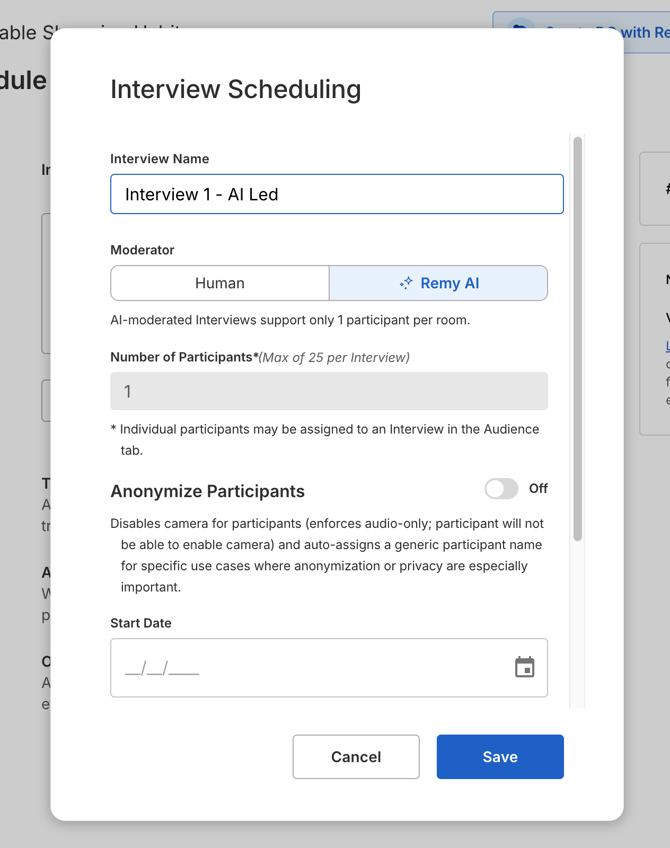
- In the Schedule step of your Video Conversation, click Add Interview (or edit an existing one).
- Under Moderator, choose Remy AI. The default is Human.
- Number of Participants locks to 1. Remy-led interviews are always one-on-one.
- Set the name, date, start time, and duration as usual, then save.
Interviews with Remy as the moderator show a Remy AI label on the interview card and in the Discussion Guide.
Running interviews at the same time. Human-led interviews in a conversation cannot overlap. Remy-led interviews can: schedule several at the same start time and Remy runs each one independently. The number that can run at once is limited during the beta; if you schedule past the limit, the modal shows a capacity error and you can move one of the interviews to another time.
Mixing human and Remy interviews. A single conversation can contain both. Human-led interviews behave exactly as they do today, and a human-led interview is never affected by the AI Interview Guide.
Changing the moderator later. You can switch an interview between Human and Remy AI until the conversation is published and the interview is about to start. Switching the last Remy-led interview to Human removes the AI Interview Guide from the conversation, and Remesh asks you to confirm before it does.
Writing the AI Interview Guide
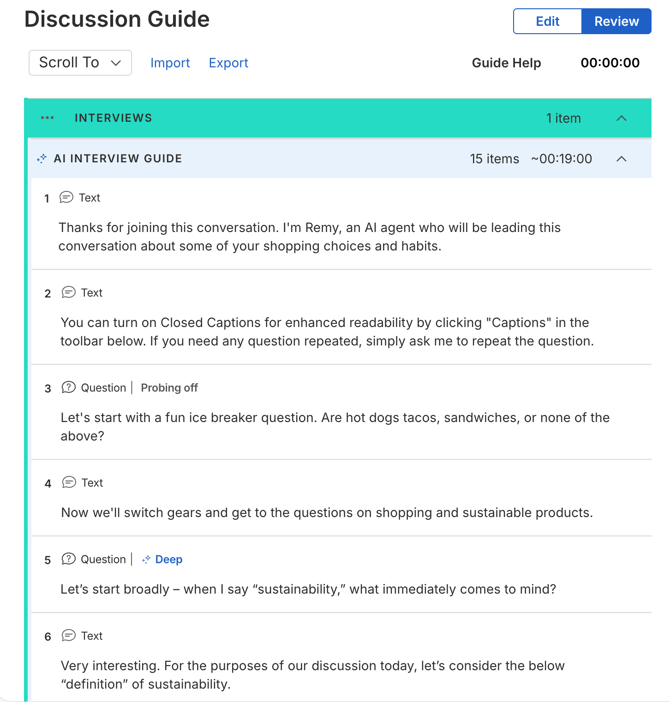
When a conversation has at least one Remy-led interview, the Interviews section of the Discussion Guide gains an AI Interview Guide. This is the script Remy speaks. It is separate from the questions participants answer on screen before and after the interview, which keep working exactly as they do in any Video Conversation (onboarding polls, pre-interview questions, post-interview questions).
One AI Interview Guide is shared by every Remy-led interview in the conversation. Remy runs it from top to bottom, one item at a time.
Item types
|
Item |
What Remy does |
Use it for |
|---|---|---|
|
Question |
Reads the question text word for word, waits for the participant's answer, then asks follow-ups according to the item's Probing Depth. |
Every open-ended question you want a spoken answer to. |
|
Speak |
Reads the text word for word and continues to the next item. Never asks a follow-up and does not wait for a response. |
Introductions, context, transitions, and the closing. |
Write both types the way you would say them out loud. Remy reads exactly what you write, so avoid anything that only makes sense on a screen ("see the definition below", bullet lists, URLs).
Starter templates
Click Add Item and choose Start from a template to insert any of three pre-written items. Each lands as a normal, editable item.
|
Template |
Type |
What it covers |
|---|---|---|
|
Introduction |
Speak |
Who Remy is, that the session is recorded, that captions are available, and that the participant can take their time or ask for a repeat. |
|
Pace check |
Question (probing off) |
Asks whether the pace is working or whether Remy should slow down or speed up. Best placed after the first question or two. |
|
Closing |
Speak |
Thanks the participant and signs off. |
We recommend starting every guide with the Introduction and ending with the Closing. Remy adds no greeting or thanks of its own; if the script does not say it, Remy does not say it.
Estimated time
The guide header shows an estimated interview length based on how long each item takes to read, a typical answer, and the follow-ups allowed by each question's Probing Depth. Compare it with the duration you scheduled. As a rule of thumb, Standard probing adds about two minutes per question and Deep probing about four.
Probing Depth and Focus Area
Every Question has two settings that control Remy's follow-ups. Open a Question and expand its settings to find them.
Probing Depth
|
Setting |
Follow-ups |
When to use it |
|---|---|---|
|
Off |
None. Remy takes the answer and moves on. |
Warm-ups, pace checks, simple factual questions. |
|
Standard |
About one follow-up. |
Most questions. |
|
Deep |
Two to three follow-ups. |
The two or three questions your study most depends on. |
Follow-ups are generated from what the participant actually said. Remy asks open-ended, neutral, single questions, never suggests answers, never asks for information the participant already gave, and never uses a follow-up to jump ahead to a later question in your guide. If a participant gives a minimal answer ("I'm not sure"), Remy may probe once without offering options and then moves on.
Focus Area (optional)
A Focus Area tells Remy what its follow-ups should explore for that question. Type your own or click a suggestion chip (Examples & stories, Barriers, Comparisons) to insert a starting phrase. For example: "Examples and stories about what sustainability means personally."
The Focus Area is never shown to participants and is never read aloud. It only steers the follow-ups Remy generates.
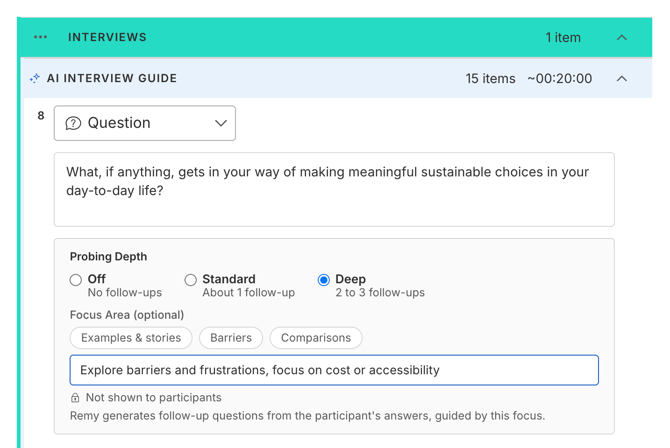
In review mode, each Question shows a compact chip summarizing its settings, for example Deep · "Barriers and frustrations" or Probing off.
Publishing
Publishing a conversation with Remy-led interviews adds one check: the AI Interview Guide must contain at least one item. If it is empty, Publish is blocked with "Please fix the errors in your AI Interview Guide to publish." Add your questions and publish again.
Everything else about publishing a Video Conversation is unchanged, including the audience setup and the participant link.
What Participants Experience
Participants join a Remy-led interview through the same link and waiting room as any Video Interview. What changes is who is on the other side.
Before joining. The Interview Policy includes a statement that the interview is led by Remy, an AI interviewer, on behalf of the research team; that Remy uses AI to process spoken responses and may select or generate follow-up questions; that the conversation is recorded and transcribed; and that a human researcher may join or take over at any time. The tech-check screen repeats this: "Your moderator today is Remy, an AI interviewer."
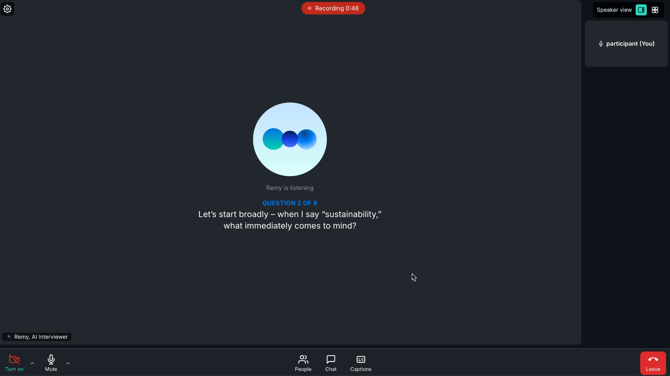
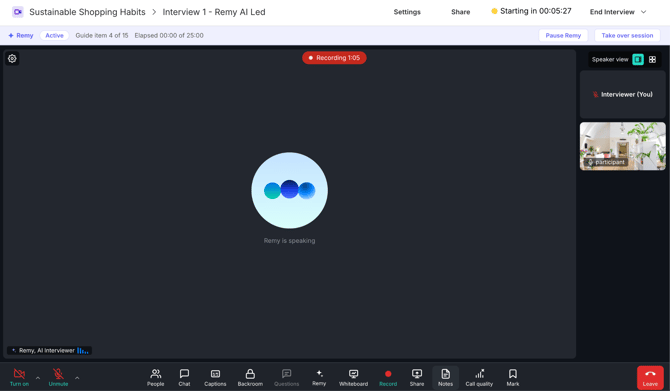
In the room. Participants see a Remy, AI Interviewer tile that shows when Remy is listening, speaking, or thinking. The current question also appears on screen as text, and participants can turn on captions.
During the conversation. Remy asks each question as written, waits for the answer, follows up as configured, and moves on. Participants can interrupt Remy, ask it to repeat a question, or ask it to slow down or speed up, and Remy adjusts. If a participant asks whether they are talking to an AI or whether the session is recorded, Remy answers honestly. Remy stays on the script: it does not chat, give opinions, or follow the participant onto unrelated topics.
Ending. After the final item, Remy ends the session and the participant sees "Session complete." Any post-interview questions in your Discussion Guide follow as usual.
Watching, Pausing, and Taking Over
You do not need to be in the room for a Remy-led interview to run. If you join, you get controls a participant does not see.
Status strip. Above the call, a strip shows Remy's status (Not started, Active, Paused, Restarting, Failed, or Ended), which guide item Remy is on ("Guide item 3 of 8"), and elapsed time against the scheduled duration.
Remy pane. Open the Remy pane to see the full guide with Remy's current position and each question's probe setting (No Probes, Standard Probes, Deep Probes).
Pause and Resume. Pause Remy lets Remy finish its current sentence and then go silent. The participant sees "Remy is paused. Your moderator has stepped in." Speak to the participant as needed, then click Resume Remy to continue from the same guide item.
Take over. Take over session hands the rest of the interview to you. Remesh asks you to confirm: "You will become the moderator. Remy will leave the interview and the participant will be told a human researcher is now leading. This cannot be undone." After you confirm, Remy leaves, the participant sees a notice with your name, and the room and recording continue until you click End Interview. Remy cannot be brought back into that interview.
What is not available while Remy moderates. The Questions control (sending Remesh questions into the room) is disabled while Remy is moderating, and recording cannot be stopped.
Observers
By default, observers cannot enter a Remy-led interview unless a human interviewer is in the room to admit them. They knock, and the knock waits until someone admits them.
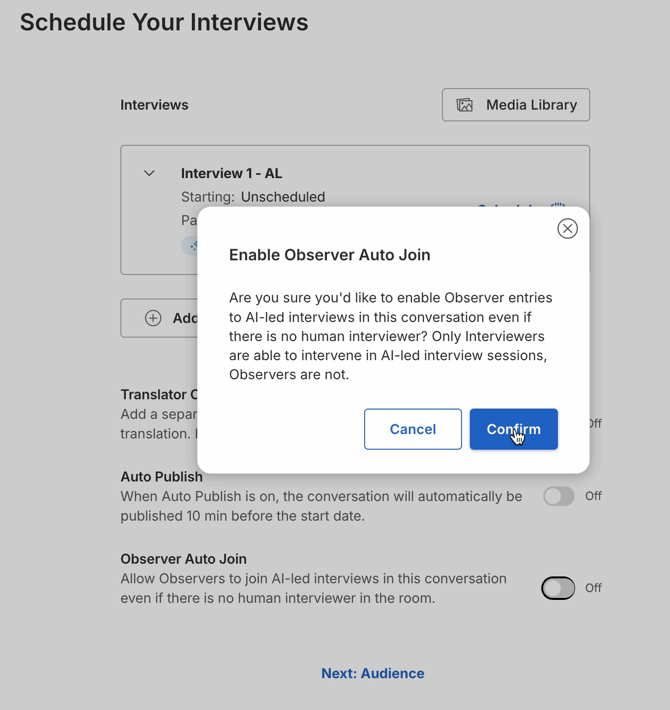
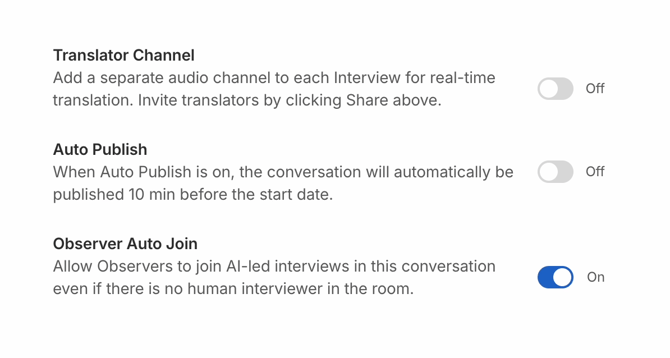
To let observers watch Remy-led interviews with no human interviewer present, turn on Observer Auto Join on the Video Interview Scheduling page. The setting appears only when the conversation has at least one Remy-led interview, applies to the whole conversation, and asks you to confirm each time you turn it on. Observers who enter this way are hidden from the participant, as in human-led interviews, and cannot intervene.
After the Interview
Remy-led interviews flow into the same Video analysis as human-led ones.
|
Output |
Notes |
|---|---|
|
Recording |
Available for every Remy-led session. Recording is automatic. |
|
Transcript |
Speakers are labeled Remy and the participant's supplied name. If you took over, your speech appears under your name. |
|
Summaries, Themes, Clips |
Generated and editable as for any Video Interview. |
|
Talk To Your Data |
Ask Remy about the interviews in the conversation's Remy chat. Remy reads the transcripts and cites them, and can analyze them alongside your Live and Flex data in the same workspace. |
|
Exports |
Transcript, recording, and chat exports work as they do today. |
Language Support
As of September 2026. Language support for Remy Interviews may expand in later releases; check this section or Supported Languages for the current list.
Remy conducts the interview in the language set on the conversation, and transcription is matched to that language. Remy Interviews are available in every Remesh conversation language except Bengali, Haitian Creole, Mongolian, Pashto, and Other. When the conversation language is Other, Remy speaks English and detects the participant's language automatically, which we do not recommend for research use.
One language runs the interview but does not produce a transcript or analysis afterward: Thai, which is not supported by Video Transcript and Analysis (see Supported Languages).
As with all AI features in Remesh, quality is highest in English and can vary in other languages. Run a test interview in your language before fielding.
What Remy Interviews Do Not Do
- Group interviews. Remy-led interviews are one participant per room. Use a human-led Video Interview (up to 25 participants) for group sessions.
- Voting or % Agree. There is no group resonance mechanism in a Remy Interview: Remy does not share other participants' answers or gather agreement. Use Live or Flex for consensus data, then interview the people you want to hear more from.
- Live to Video handoff. A Live Conversation cannot move participants into a Remy-led interview. Schedule Remy Interviews in a standalone Video Conversation.
- Rewriting your questions. Remy reads Questions and Speak items exactly as written. Only the follow-ups are generated.
- Sending Remesh questions mid-interview. Polls, rankings, and other on-screen questions cannot be sent while Remy moderates. Use pre-interview and post-interview questions instead.
- Choosing Remy's voice. Remy uses one voice during the beta. A per-conversation voice picker with previews is coming soon.
- Hand-back after takeover. Once you take over, Remy does not return to that interview.
Troubleshooting
- I do not see the Moderator option when scheduling an interview. Remy Interviews are enabled per workspace during the beta and also require full Video access and Remy enabled for your workspace.
- Publish is blocked with an AI Interview Guide error. At least one Remy-led interview points to an empty guide. Add at least one Question or Speak item to the AI Interview Guide and publish again.
- The Moderator control is greyed out. Once the conversation is published and an interview is about to start, its moderator can no longer be changed. Create a new interview instead.
- The interview started but Remy has not spoken. Remy joins as the participant is admitted and starts within a few seconds; the status strip shows Starting, then Active. If it shows Failed or Restarting for more than a minute, join the room and take over, then file a support ticket with the interview name.
- An observer is stuck waiting to join. With Observer Auto Join off, observers knock and need a human interviewer in the room to admit them. Turn the setting on for the conversation, or have an interviewer join and admit them.
- The participant never showed up. Remy waits in the room and then ends the session as an empty room. No recording or transcript is produced for a session with no participant.
- The participant dropped mid-interview. Remy holds the session for a short grace period so the participant can rejoin from the same link and continue from the current question. If they do not return, the session ends and whatever was recorded is transcribed.
- Remy asked a question that had already been answered, or repeated itself. This can happen after an interruption or a long pause. Participants can simply say the question was already answered and Remy moves on. Please report the interview name to your Customer Success Manager so the team can review the session.
- Switching an interview to Human deleted my AI Interview Guide. Changing the last Remy-led interview in a conversation to Human removes the guide after a confirmation. Duplicate the conversation before making that change if you want to keep the script.
Frequently Asked Questions
- Is a Remy Interview a Video Conversation? Yes. It is a Video Interview with Remy set as the moderator. Everything about Video Conversations applies except where this article says otherwise.
- Can Remy run a focus group or a 1:many interview? No. Remy-led interviews are one participant per room. Human-led Video Interviews support up to 25 participants.
- Does Remy capture agreement across participants, like % Agree? No. There is no voting or group resonance in Remy Interviews. Each interview is an independent one-on-one conversation. For consensus data, run a Live or Flex Conversation.
- Can I hand participants from a Live Conversation into a Remy Interview? Not at this time. The Live to Video handoff works only for human-led interviews. Schedule Remy Interviews in a standalone Video Conversation.
- Which languages are supported? All Remesh conversation languages except Bengali, Haitian Creole, Mongolian, Pashto, and Other. Thai runs the interview but has no transcript or analysis. See Language Support.
- Can one conversation include interviews in different languages? No. Remy uses the conversation's language for every interview in it. Create a separate Video Conversation per language.
- Does Remy write the interview questions? No. You write every Question and Speak item, and Remy reads them exactly as written. Remy generates only the follow-up questions, within the depth you set. Starter templates are available for the introduction, pace check, and closing.
- Will Remy change or paraphrase my questions? No. Questions and Speak items are read verbatim and in order. If a participant asks Remy to repeat a question, Remy repeats the exact text.
- How many follow-ups will Remy ask? None with Probing Depth Off, about one with Standard, and two to three with Deep. Set it per question.
- Do participants know they are talking to an AI? Yes. The Interview Policy and the tech-check screen both disclose that Remy is an AI interviewer and that the session is recorded and transcribed. If asked directly during the interview, Remy confirms it is an AI.
- Does someone from my team need to be in the room? No. Remy runs the whole interview and ends the session on its own. You can join at any time to watch, pause, or take over.
- Can I run several Remy Interviews at the same time? Yes. Remy-led interviews can overlap, unlike human-led ones. The number that can run at once is limited during the beta.
- How long can a Remy Interview be? Any duration the scheduler offers, up to 3 hours, the same as a human-led Video Interview. Remy runs for the full scheduled time; as the scheduled end approaches, Remy wraps up the conversation, so keep the guide's estimated time within the duration you schedule. For optimal Participant experience and engagement, we recommend targeting 60 or fewer minutes for a Remy Interview session.
- Can participants use captions? Yes. Captions are available in the room, and the current question also appears on screen as text.
- Can I use my existing Discussion Guide? Your onboarding, pre-interview, and post-interview questions work unchanged. The spoken script lives in the AI Interview Guide, so copy your interview questions there as Question items and adjust the wording so it reads well aloud.
- Can I share stimulus (images, video, concepts) during a Remy Interview? No, media sharing and Remesh questions are not available while Remy moderates at this time. Show stimulus in pre-interview questions, or use a human-led interview.
- Where does the data go? Recordings, transcripts, summaries, themes, and exports appear in the conversation's Video analysis like any other interview. Remy can analyze the transcripts in Talk To Your Data.
- How is the audio processed? Remy uses an AI speech model to process the participant's audio in real time during the interview. Recordings and transcripts are handled under the Remesh Conversation Terms and Privacy Policy, the same as human-led Video Interviews.
- Can I pick a different voice for Remy? Not during the beta. A per-conversation voice picker with previews arrives at general availability.
- Can I take over and then give the interview back to Remy? No. Takeover is permanent for that interview. Use Pause and Resume if you only need to step in briefly.
- I found an issue or have feedback. Please file a support ticket.