![59b7eb52c29cb1fb87e1bba7bf1ef88c41152899.png]](https://help.remesh.ai/hs-fs/hubfs/59b7eb52c29cb1fb87e1bba7bf1ef88c41152899.png?height=40&name=59b7eb52c29cb1fb87e1bba7bf1ef88c41152899.png)
Overview
Recruit and incentivize a targeted audience for your Remesh Live or Flex Conversation without leaving the platform. With Remesh On Demand Recruit, you can customize your recruitment criteria, set quotas, program your discussion guide, and monitor recruit progress directly in Remesh.
Remesh Recruit is designed for audiences that meet a minimum 15% incidence rate. If a recruit may not be completed within a reasonable time frame, Remesh will pause the recruit and give you options to adjust your custom quota caps, resume recruitment, or cancel the recruit.
Included in this Article
- How It Works
- Programming Your Recruit
- Submitting Your Recruit
- Additional Settings
- Monitor Your Recruit
- Daily Sample Status Email
- Terminated Participants
- Paused Recruitment
- Frequently Asked Questions
How it Works
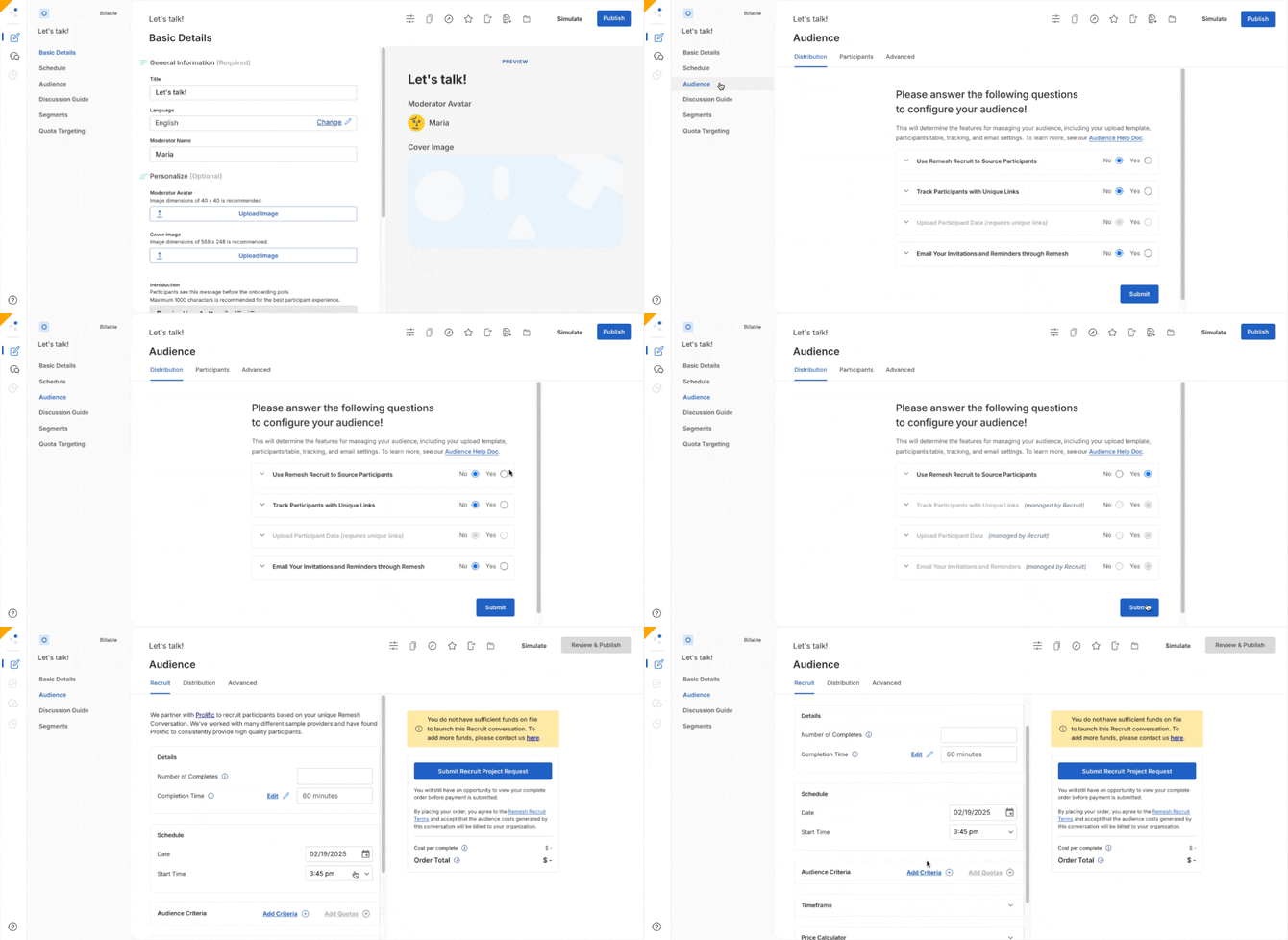
To enable Remesh Recruit, simply select yes to “Use Remesh Recruit to Source Participants” from the Audience page. After submitting your selection, you will be able to further customize your recruit.
Programming Your Recruit
There are a number of ways that you can customize your recruitment to reach your desired audience. As you adjust fields, your Recruit Cost Estimate, Cost Per Complete and Estimated Recruiting Time will automatically adjust based on the criteria selected. 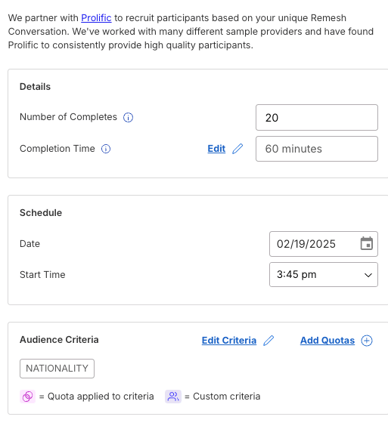
If conducting a Flex Conversation, we recommend programming your discussion guide before outlining your recruitment criteria, to get a better timing estimate. You will need to complete your discussion guide before launching.
- Number of Completes: the number of Participants you want to take part in your Conversation.
- Completion Time: This is an automated estimate based upon your programmed discussion guide for Flex Conversations. For Live Conversations, simply input the amount of time you intend to engage with your participants.
- Schedule: When conducting a Live Conversation, you will need to schedule your Conversation start time which must be at least 2 days in advance. When conducting a Flex Conversation, you do not need to schedule as your Conversation will start as soon as you review and launch.
- Audience Criteria: You have the option to program from our list of demographic criteria, program your own custom criteria or a mix of both. Onboarding polls will appear in your discussion guide that align with what you programmed in these fields.
- Standard Criteria: Here you can select from a list of pre-built demographic criteria that you would like your audience to meet. You can either browse our list of categories or use the search bar to search all attributes.
- Custom Criteria: Input your own desired criteria by entering a poll question along with termination or must select logic.
- Estimated Recruitment Time: If conducting a Flex Conversation, as you program your criteria the Estimated Recruitment Time will automatically adjust accordingly with an approximation. This field will not exist in Live Conversations, as we simply require a minimum of 2 days of recruitment time for Live Conversations.
- Price: The price listed will include all sample costs. This price is not inclusive of software costs, which are billed and priced separately. You can reach out to your Remesh Account Director for more information.
On Demand Recruit is meant to support recruitment that does not involve complex logic or highly specialized criteria. It supports audiences with a minimum 15% incidence rate. After you submit your recruit, Remesh monitors whether recruitment can be completed within a reasonable time frame. If the recruit is forecasted to fall below the 15% incidence rate or custom quotas are unlikely to fill, Remesh may pause your recruit and notify you.
Submitting Your Recruit
| Live | Flex |
|---|---|
|
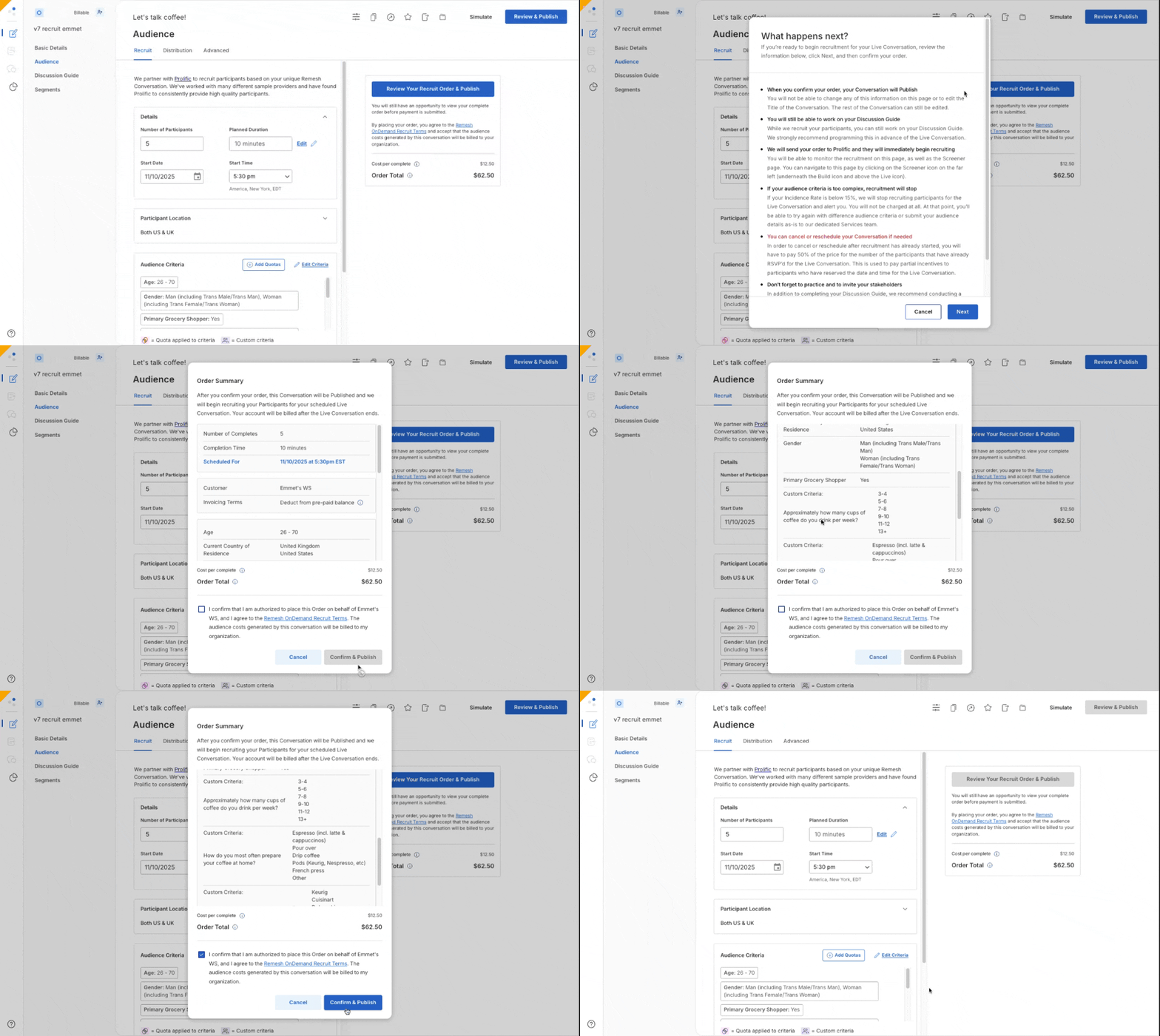
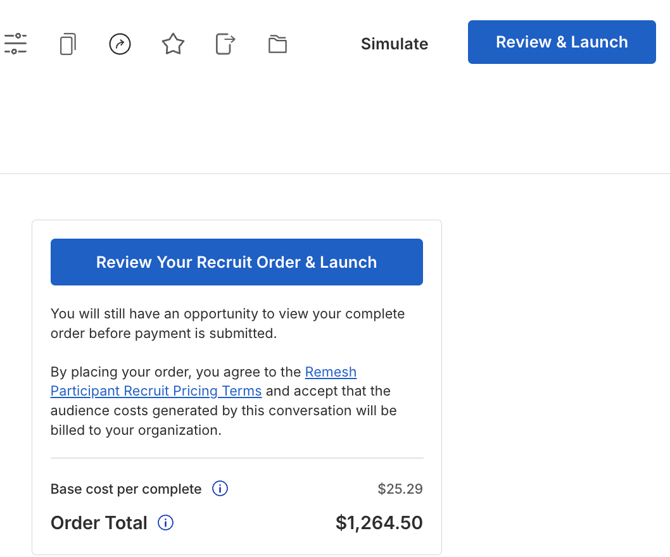
Submit your recruit by clicking "Review Your Recruit Order & Publish" |
Submit your recruit by clicking "Review Your Recruit Order & Launch" |
|
Upon submitting, recruitment will start immediately and the Conversation will be published but responses will not be collected until the programmed start time. |
Upon submitting, recruitment will begin and responses will start being collected. |
| Participants will be directed to access your Conversation at the designated start date/time and stay through the duration. | Participants will be directed to access your Conversation at their earliest convenience and will continue until the desired number of completes is reached, or until manually ended. |
| Live conversations using Remesh Recruit must be scheduled at least 2 business days in advance, and can be scheduled up to 10 business days in advance. You can submit your recruit at any point in that window. | Flex Conversations using Remesh recruit are not scheduled in advance, and begin recruiting and collecting responses immediately upon recruit submission. |
| After submitting your recruit, you can continue to work on your Discussion Guide. | You must program your Discussion Guide before submitting your recruit for a Flex Conversation. You can make certain edits to your Conversation after submitting your recruit, but we recommend exercising caution as this can result in inaccurate data. We strongly recommend finalizing your Discussion Guide before submitting. |
| After submitting your recruit, you will not be able to change the Title of the Conversation, or any of the information on the Audience page. The rest of the Conversation can still be edited. | After submitting your recruit, you will not be able to change the Title of the Conversation, or any of the information on the Audience page. |
Additional Settings
- Display Logic: Utilize Display Logic to randomize sections of your discussion guide to decrease order bias.
- Segments: Segments allow you to cut your data as you analyze based upon polls asked in your Remesh Conversation. You can create Segments before, during or after your Conversation, but we recommend programming a few Segments before Launching your Conversation.
- Quotas: You can set quotas for certain recruitment criteria by clicking the "Add Quotas" button next to the audience recruitment criteria. You must first select audience recruitment criteria before this option becomes available. Quotas are available for standard or custom criteria, but can only set a quota on a single select poll.
Monitor Your Recruit
You can monitor your recruit by returning to the Audience page where you programmed your recruit, or by clicking the following icon  on the left hand side of your screen.
The audience page will have Recruitment Status section. In this space you will be able to monitor the Initial Screen, Screening Feasibility and Quota Feasibility. This can help you monitor if your recruit is progressing as planned.
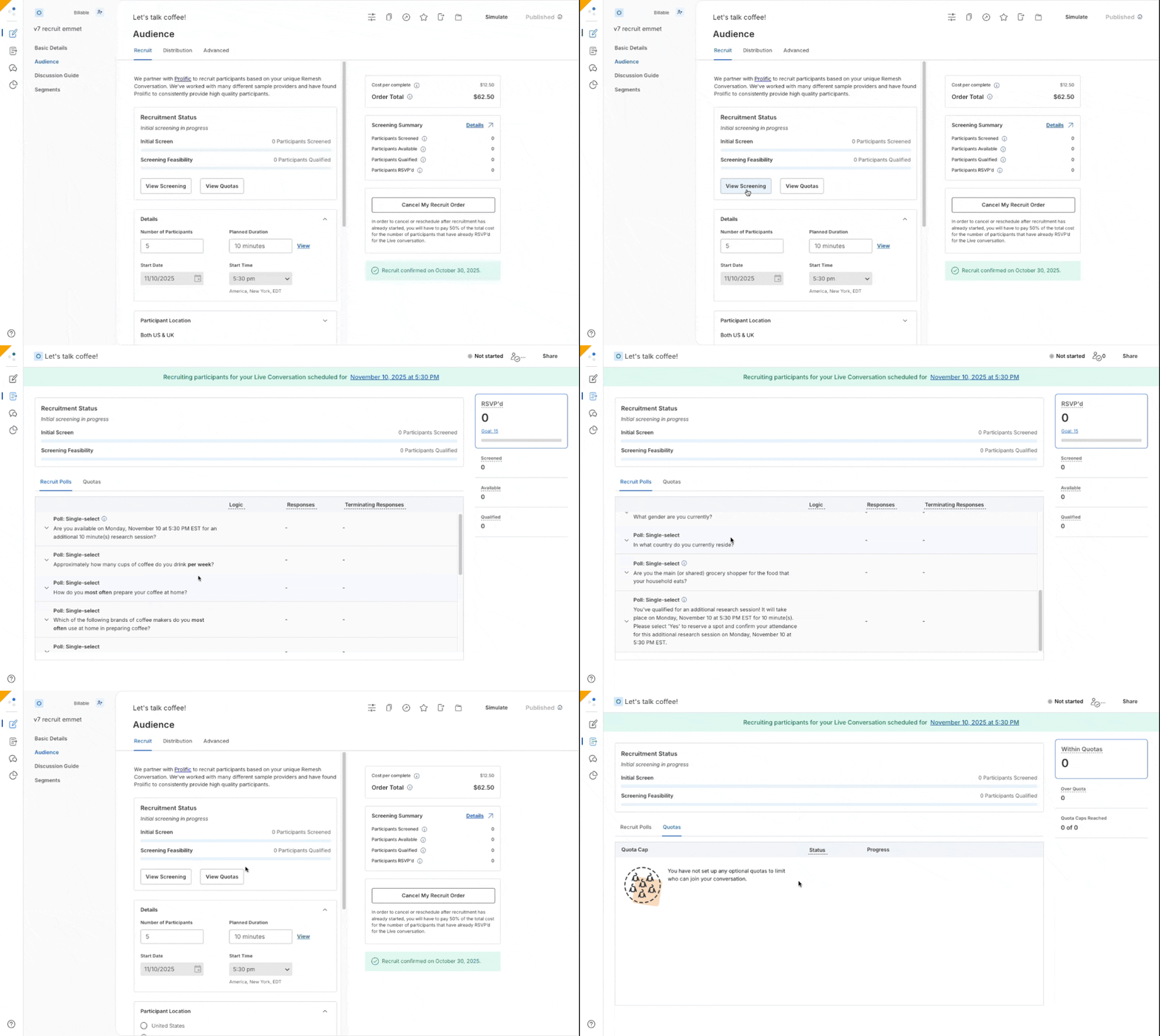
Our on platform recruitment tool is meant to support recruitment is meant to support recruitment of audiences above a 15% incidence rate. After you submit your recruit, our system monitors the recruit and if it forecasts that your recruitment may not be completed within a reasonable time frame or the incidence rate dips below 15%, we will pause your recruit and notify you.
Daily Sample Status Email
During the active recruitment window, Remesh sends an automated daily sample status email every 24 hours to your conversation moderators. The email summarizes recruit progress and quota fill so you do not have to refresh the dashboard to know where things stand.
The daily sample status email is sent for both Live and Flex Remesh Recruit conversations. The cadence is the same for both conversation types, but the Recruit Status fields differ because Live and Flex have different recruitment windows.
| Live Recruit | Flex Recruit | |
|---|---|---|
| Starts | At sample creation or recruit launch | At sample creation or recruit launch |
| Sends | Every 24 hours | Every 24 hours |
| Stops | When the conversation start date is reached | When the conversation end date is reached |
Live recruits end before the session begins, so the Live email tracks time remaining until the conversation starts. Flex recruits continue throughout the active conversation window, so the Flex email tracks time remaining until the conversation ends.
Terminated Participants
When you use screener polls in a Remesh Recruit study, some participants may be screened out, or terminated, before joining the qualified audience. Their screener-poll responses are still recorded, but they are hidden by default in both Live and Analysis so your view stays focused on the audience that qualified.
The Conversation data by participant CSV export includes one row per participant with their screener-poll responses. Participants are split into two sections:
- Participated: Qualified participants who progressed beyond the screener
- Rejected: Participants who were terminated by a screener
Poll options that drive a screener termination now show a red Terminate label in the Analysis view of that poll. This matches the existing behavior in Live and the Discussion Guide Builder, making termination logic visible across surfaces.
If you need to inspect the full screener population for diagnostics, reporting, or to understand why the funnel narrowed, turn Show All Participants (Including Term Outs) on.
You can find this toggle in two places:
- Live view: At the top of the ODR Audience panel
- Analysis view: At the top of the Onboarding Polls sidebar
Paused Recruitment
Remesh may pause a recruit if the custom-quota feasibility check determines that one or more custom quotas may not be met with the current traffic.
When this happens, Remesh pauses the study rather than immediately ending it. This gives you a chance to review the issue and decide whether to adjust your custom quota caps, resume recruitment, or cancel the recruit.
What happens when a recruit is paused?
- Prolific stops sending new traffic immediately.
- Participants who are already in progress can finish normally.
- The conversation moderator receives an email explaining that the study has been paused and why.
- A Study Paused banner appears on the Conversation dashboard with the same context.
Next Steps
| Action | What it Does |
| Edit custom quota caps | Adjust custom quota caps inline. Each cap is floored at the number of participants already accepted into that segment, so you can raise caps but cannot reduce them below collected counts. |
| Resume | Restarts the recruitment with your updated caps. Custom quota caps remain editable after you resume. |
| Cancel | Stops the recruitment and ends the Conversation. Use this when you decide the recruit cannot be made viable. |
| No action | Flex recruits will be automatically cancelled after 24 hours and Live recruits will be automatically cancelled after 12 hours. |
Pricing
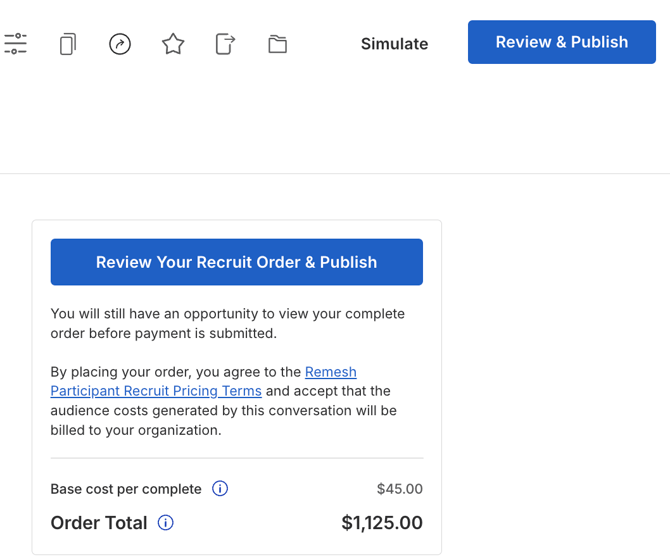
Pricing for Remesh Recruit is based solely on the type of conversation and staying below a 15% incidence rate.
- The rate for Flex conversations is $1.00 per participant per minute.
- The rate for Live conversations is $1.25 per participant per minute.
This cost and the Order Total price is not inclusive of software costs, which are billed and priced separately. Please reach out to your Account Director for more information.
There is no change in cost for the number of criteria added. However, adding multiple audience criteria may result in your incidence rate falling low 15%, at which point Remesh Recruit will not be able to fulfill your recruitment. If this happens, we will put you in touch with our recruitment team who are well equipped to handle in-depth specialized recruitment.
Frequently Asked Questions
- In what markets can you currently recruit using this feature?
US and UK - What are the available audience criteria?
We have dozens of audience criteria available which you can find more details about here. You are also able to program your own custom criteria as well. - Do I need to program the discussion guide before calculating costs?
No! You can get an estimate before creating your Discussion Guide by selecting Price Calculator on the Remesh Recruit page.
For Flex conversations, you will need to complete your Discussion Guide before launching your recruit.
For Live conversations, you can publish your Conversation (which begins recruitment) before you have finished your Discussion Guide - How long does it take to fully recruit a Remesh Recruit Conversation?
Most Flex conversations using Remesh Recruit are typically completed within 12-24 hours, but can take up to 2-3 business days.
Live conversations require at least 2 business days for Remesh Recruit to source all of your participants, but you can schedule your Live conversation to be anytime between 2 and 10 business days in the future. If there are any issues or concerns with your Remesh Recruit, we'll reach out to you within 24 hours of when you Launch the Conversation. - What happens if my Recruit is too complex?
If less than 15% of participants meet your custom criteria, or if a Quota isn’t filling up enough to the point where it likely won’t fill up at all, the system will automatically stop the Recruit. - What happens to participants already in the study when it's paused?
In-flight participants finish normally. Pause only halts new traffic. - Can I unsubscribe from the Daily Sample Status Email? Not at the moment. The email sends during the active recruitment window only and stops once the conversation starts.
- Is there a price difference between Standard and Custom Criteria?
Nope! Pricing for Remesh Recruit is based solely on the type of conversation. - Is the price inclusive of incentive?
Yes, the price displayed in the platform includes all sample costs. This price is not inclusive of software costs, which are billed and priced separately. You can reach out to your Account Director for more information. - Is the price inclusive of software costs?
No, the Order Total price is not inclusive of software costs, which are billed and priced separately. You can reach out to your Account Director for more information. - Why can’t I launch Remesh Recruit conversations?
This feature currently requires customers to pay for credit up-front in order to launch a Remesh Recruit conversation right away. If you want to add credit to your account, please reach out to your account team. - How do I know what question was asked for the pre-built Audience Criteria
When you’re looking at Standard Criteria, if you hover over the “About” icon, you’ll be able to view exactly what question was asked to participants to collect the criteria options. - What happens if not enough participants show up to my Live conversation?
If not enough participants attend the Live conversation, you’ll receive notifications on the platform containing instructions.- Conduct the Live conversation as originally planned with the participants that attended.
- Once this conversation ends, we’ll automatically create a duplicate for you.
- We’ll reach out to you afterward - if you decide you need more participants, we’ll recruit them into that copy and then combine both conversations, so that you’ll have all of your data in one place.
- No matter what, you’ll only be charged for the number of participants you originally requested or the total number of participants who complete the conversation(s), whichever is lower.
- What happens if too many participants show up to my Live conversation?
- If we over-achieve your N-size, great! We intentionally overrecruit in case a couple participants happen to drop off during the Live conversation.
- No matter what, you’ll only be charged for the number of participants you originally requested or the total number of participants who complete the conversation(s), whichever is lower.